Classroom Makerspaces in US Schools: Tools, Standards, Safety and Funding by Grade
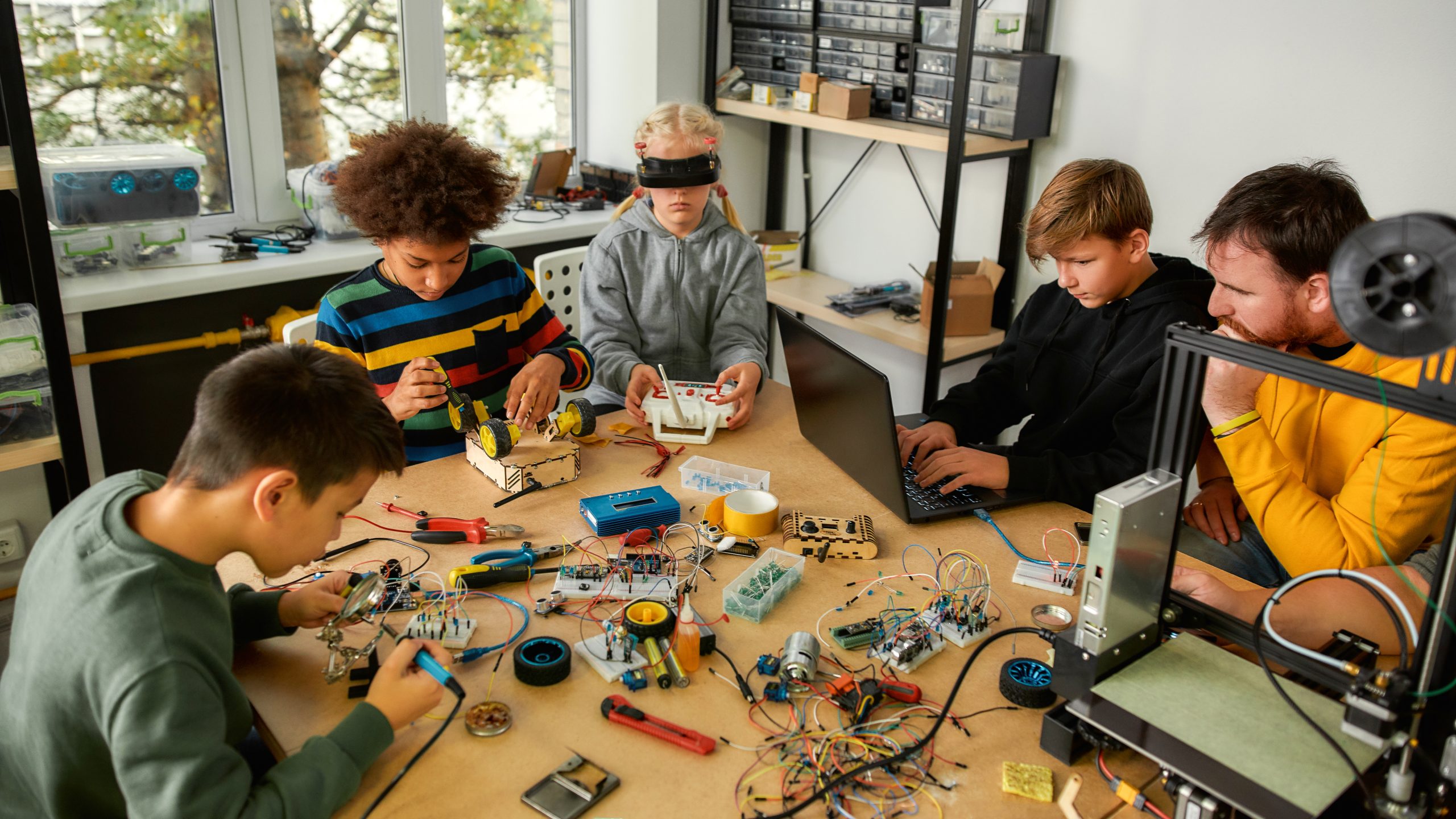
A classroom makerspace is a hands-on space, led by a teacher, where students take a design from idea to working object and refine it. In US schools it can support engineering design standards, computer science requirements, and Career and Technical Education programs of study.
In more than 25 years of equipping classrooms, the question we hear most often is how to justify a makerspace to the people who approve the budget.
That case is easier to make than most people expect, because much of the learning a makerspace supports is already written into the standards districts are working from. Engineering design sits in the Next Generation Science Standards from kindergarten through high school. Perkins V puts federal money behind Career and Technical Education and requires districts to assess their own program needs on a fixed cycle. A makerspace is one practical way to deliver that learning.
This page works through the decision in order: the standards case, the federal labor data that informs the budget argument, the tools that suit elementary, secondary and postsecondary programs, and the safety and procurement rules that decide what you can actually put in a classroom.
In brief: A classroom makerspace is a teacher-led learning area where students design, build, test and improve physical or digital projects. The best equipment depends on grade level, curriculum requirements, room ventilation and power, staff training, safety certification and district procurement rules. Elementary programs usually begin with shared hands-on tools, while secondary and postsecondary programs add fabrication, robotics, drones and production equipment.
Key Takeaways
- Engineering design appears in the Next Generation Science Standards at every grade band, from K-2 through high school.
- Perkins V directs about $1.4 billion a year to state CTE grants and requires a local needs assessment at least every two years.
- Only 12% of US high school graduates earned an engineering credit in 2019, against 20% who completed computer science.
- OSHA requires electrical equipment to be approved, and a Nationally Recognized Testing Laboratory listing is the practical route for schools.
- A K-12 drone program usually falls under FAA Part 107, not the recreational rule, which surprises most schools.
- Start with one standard or program requirement and the room’s ventilation and power, then request a quote for a grade-appropriate starter set.
What Is a Classroom Makerspace?
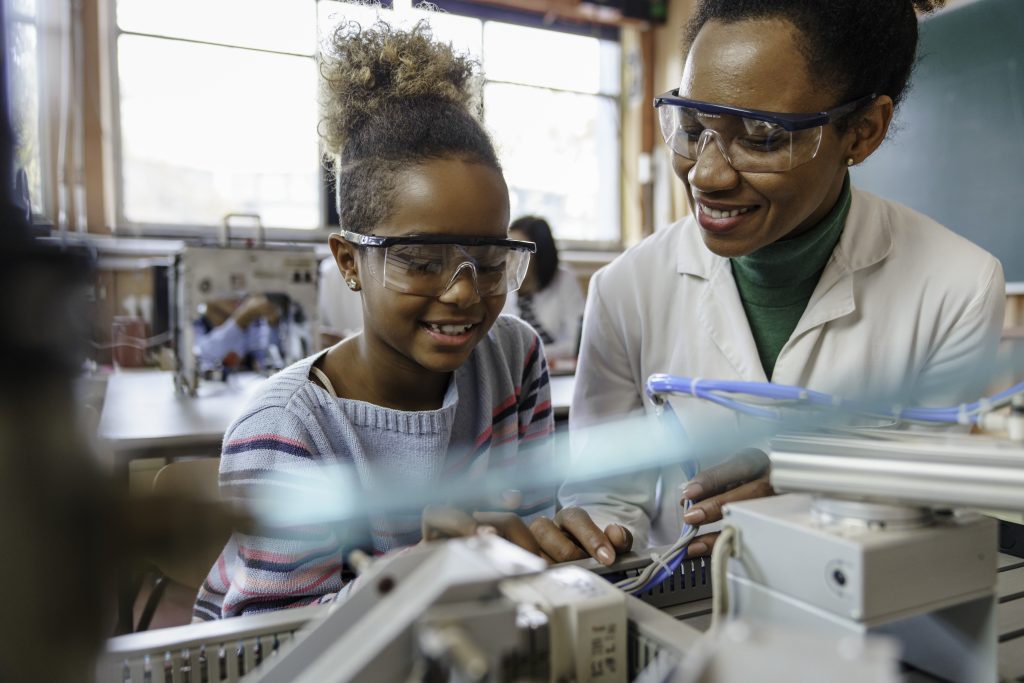
At its simplest, it is a dedicated area equipped with tools that let students turn an idea into a physical or digital object, then improve it. The equipment varies enormously from school to school; the purpose does not vary at all.
Two things get confused with it often enough that separating them helps. A public library makerspace is drop-in and community-facing, open to whoever walks through the door. A STEM lab is usually built around a subject, with equipment chosen to support science or computer science specifically. A classroom makerspace is standards-linked and teacher-led, which changes what you buy and how you staff it.
The tools matter less than the loop they enable. We have walked into schools with excellent equipment sitting unused because nobody designed the teaching around it, and into schools doing remarkable work with cardboard, a cutting tool, and a class set of 3D pens.
The Design Cycle That Makes It a Makerspace and Not a Storage Room
We did not invent that loop. It is written into the standards most districts already work from, and the International Technology and Engineering Educators Association puts it plainly in its 2020 Standards for Technological and Engineering Literacy: “Making and doing are at the heart of what makes technology and engineering so different from other fields. Technology and engineering students design and build technological products and systems.”
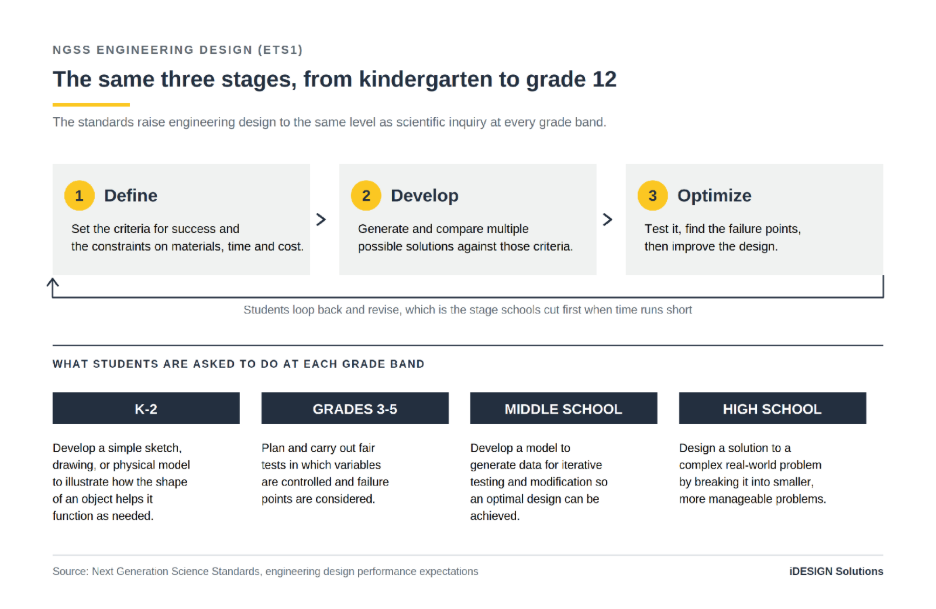
The Next Generation Science Standards turn that into three things students do at every grade band:
- Define the problem. At grades 3-5, students “define a simple design problem reflecting a need or a want that includes specified criteria for success and constraints on materials, time, or cost.”
- Generate and compare solutions. They “generate and compare multiple possible solutions to a problem based on how well each is likely to meet the criteria and constraints.”
- Test, then improve. They “plan and carry out fair tests in which variables are controlled and failure points are considered to identify aspects of a model or prototype that can be improved.”
That last one is the stage schools cut first when time runs short, and it is the one that converts a build session into learning. When we help plan a space, we ask what testing and revision will actually look like before we talk about equipment. If nobody can answer that, the equipment list is premature.
Why Classroom Makerspaces Fit US Standards and CTE Programs
US education is state-led, so there is no single national curriculum to point at. What there is instead is a set of standards and a federal funding law that between them put design, building and testing in front of students at every grade band.
One clarification before the detail, because it matters in a budget meeting. What these frameworks require, or fund, is the learning, not the room. That works in your favor. It means the case you make internally is that the space serves requirements the district already carries, rather than introducing an unrelated initiative.
| Framework | Scope | Grades | Status |
| NGSS engineering design (ETS1) | 20 states plus DC adopted NGSS; 24 more use Framework-based standards | K to 12 | State-adopted standards |
| Perkins V | Federal CTE law, formula grants routed through state agencies | Secondary and postsecondary | Federal funding, state plans required |
| ITEEA Standards for Technological and Engineering Literacy | National technology and engineering standards, published 2020 | Pre-K to 12 | Voluntary professional standards |
| State computer science credit | North Carolina, South Carolina, Tennessee, Arkansas among others | High school | Graduation requirement in those states |
Engineering Design Is in the Science Standards From Kindergarten
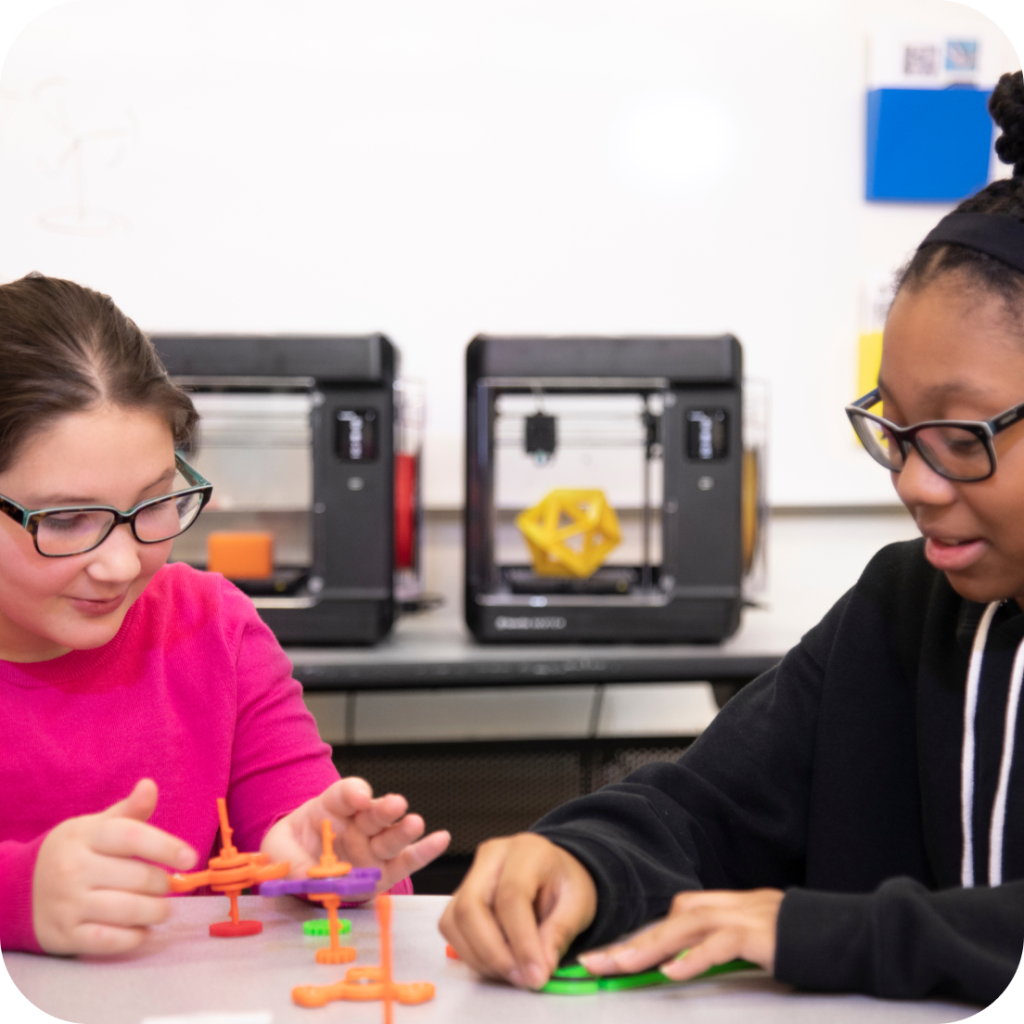
The NGSS Appendix on engineering design states the commitment directly. The standards “represent a commitment to integrate engineering design into the structure of science education by raising engineering design to the same level as scientific inquiry when teaching science disciplines at all levels, from kindergarten to grade 12.”
The progression is concrete, and it maps almost exactly onto what a makerspace lets students do.
At K-2, students “develop a simple sketch, drawing, or physical model to illustrate how the shape of an object helps it function as needed to solve a given problem.” At grades 3-5 they run fair tests and identify failure points. At middle school they “develop a model to generate data for iterative testing and modification of a proposed object, tool, or process such that an optimal design can be achieved.” By high school they “design a solution to a complex real-world problem by breaking it down into smaller, more manageable problems that can be solved through engineering.”
A physical model, iterative testing, an optimized design. Those are makerspace verbs, written into science standards.
On reach, the National Science Teaching Association reports that “twenty states and the District of Columbia (representing over 36% of U.S. students) have adopted the Next Generation Science Standards,” and that another twenty-four states “have developed their own standards based on recommendations in the NRC Framework for K-12 Science Education.” That is 44 states working from the same underlying framework. NSTA is one of the organizations that developed NGSS rather than a government agency, so treat those counts as the standards body’s own figures.
Perkins V Funds the Programs and Requires a Needs Assessment
For CTE programs the driver is federal. The Strengthening Career and Technical Education for the 21st Century Act, known as Perkins V, sends money to states for CTE and sets conditions on how districts plan.
The US Department of Education’s Perkins Collaborative Resource Network states that “each year under the Perkins statute, Congress appropriates approximately $1.4 billion dollars in State formula grant funds under Title I (Basic State Grants) to develop more fully the academic knowledge and technical and employability skills of secondary and postsecondary education students.”
Two provisions matter for anyone building a case for equipment.
First, the statute requires a local needs assessment. To receive funds, a district must “conduct a comprehensive local needs assessment related to career and technical education” and update it “not less than once every 2 years.” That assessment has to describe whether CTE programs are “sufficient in size, scope, and quality to meet the needs of all students served.”
Second, Perkins defines CTE to include “competency-based, work-based, or other applied learning that supports the development of academic knowledge, higher-order reasoning and problem-solving skills, work attitudes, employability skills, technical skills, and occupation-specific skills.” Applied learning is in the definition of the thing being funded.
If your program’s needs assessment says the equipment is not sufficient in size, scope or quality, that is not a wish list. It is a documented finding in a federally required document.
State Computer Science Requirements
Several states have made computer science a graduation requirement, which puts coding in front of every student in those states rather than only the ones who elect it.
North Carolina’s statute requires “a passing grade in a computer science course,” and specifies that “the computer science course shall fulfill one credit that is not an English, mathematics, science, or social studies credit.” The state education agency has set full implementation for the 2026-2027 school year, and every public school unit has been required to offer an introductory middle school computer science elective since 2025-2026.
South Carolina includes one unit of computer science in its 24-unit diploma. Tennessee includes one computer science credit in its 22, and allows it to substitute for a fourth math credit or third lab science credit. Arkansas requires one unit of an approved computer science course, “beginning with the entering ninth grade class of 2022-2023.”
A makerspace gives that code somewhere to go. Writing a loop that moves a robot ninety degrees and watching it move eighty-seven is a different learning experience from a program that only prints to a screen.
The Skills Students Build in a Makerspace
Every skill below is named in US standards or in the federal definition of CTE. That is a claim we can source line by line: the standards name these skills, and a makerspace is where they practice them with their hands.
Design Thinking and Prototyping
Design thinking has become a loose term. In the NGSS it is a specific sequence with specific verbs: define criteria and constraints, generate and compare solutions, build a model, test it, identify failure points, improve.
A student who builds a bridge in a slide deck can defend any claim they like. A student who builds it from cardboard and loads it watches it fail, and then has to work out why. That difference is the whole argument for physical tools. The object either works or it does not, and the feedback arrives immediately, without a teacher having to supply it.
ITEEA’s standards name the same thing as a practice in its own right. Among the eight practices in the 2020 framework are Making and Doing, Critical Thinking, Optimism, and Collaboration, which is a fair description of what a working makerspace asks of a student.
Coding and Computational Thinking
Coding in a makerspace is different from coding at a screen because the output moves.
In states with a computer science graduation requirement, students must complete an approved computer science course. In states without one, coding usually arrives through electives, CTE pathways or science courses. Either way, the makerspace is where a program controls a motor, reads a sensor, or drives a machine that cuts something out.
We have watched students who described themselves as bad at math spend an hour tuning a single value because a robot kept missing a line. That is debugging with a reason the student can see.
Problem-Solving, Collaboration, and Communication
These are the skills that survive long after a student forgets which button starts the printer, and the federal definition of CTE quoted earlier names every one of them.
Sharing a bench, returning tools, working to a deadline and explaining a design decision to someone else are not classroom management details in a CTE program. They are part of what the program is funded to teach.
The practical consequence is a design decision. Build the space so cleanup is quick, storage is obvious, and two groups can work without colliding, and you make those outcomes achievable rather than aspirational.
What the Evidence Does and Does Not Show
We want to be straight about the limits of the record, because a claim that collapses under a superintendent’s follow-up question is worse than no claim.
In July 2026 we searched the published output of the Department of Education, the National Center for Education Statistics and the National Science Foundation, and did not find a US government study showing that makerspaces improve standardized test scores. This does not mean no relevant academic research exists. It means we are not using a government test-score claim as part of the purchasing argument, and anyone who does make that claim should be asked for the citation.
What is established is narrower and, for a budget case, more useful. These skills are named in state standards and in federal CTE law, and federal CTE law goes as far as naming makerspaces among the activities local Perkins funds support, which we quote under Train the Teacher First. The major statistics, regulatory claims and standards references on this page link to their original government or institutional sources. That argument survives scrutiny, which is why we build our proposals on it.
The Career Case: What Federal Data Says About Makerspace Skills
Principals and district buyers who have to justify this spend need something firmer than a claim about engagement. Federal data carries the argument in three parts: where the openings are, how few students meet engineering before they leave school, and how early the automation curve still is.
One caution before the numbers, because it shapes how you should use them. These projections do not describe a uniform shortage, and some of the occupations cited most often in this conversation are growing slowly. We come back to that below, because it is the part of the argument that most often fails review.
Where the Openings Are Between 2024 and 2034
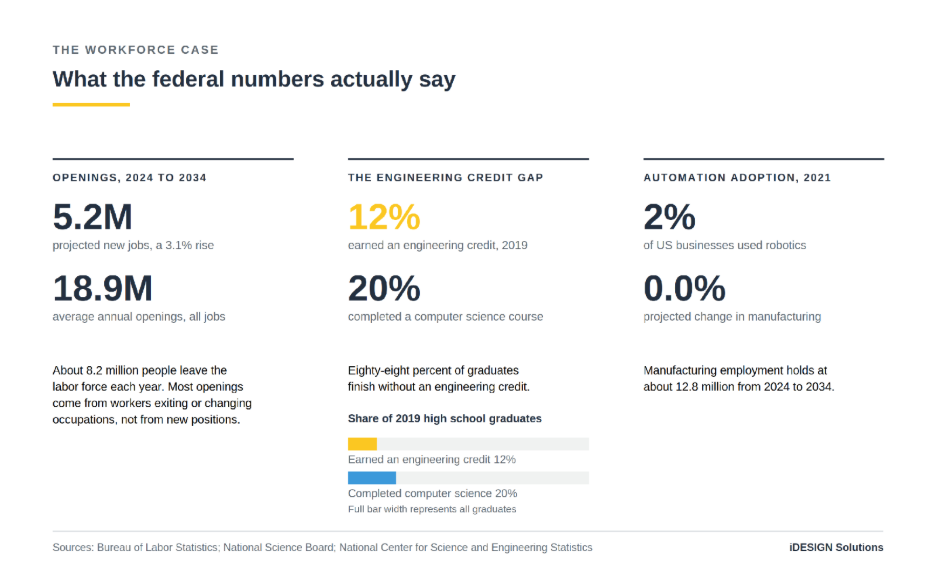
The Bureau of Labor Statistics projects that “the U.S. economy is projected to add 5.2 million jobs from 2024 to 2034,” a growth rate of 3.1%.
Growth is the smaller part of the story. BLS separations and openings data projects an annual average of about 18.9 million occupational openings across all occupations. Most of those come from turnover rather than from new positions: roughly 10.2 million a year from workers transferring into a different occupation, and about 8.2 million from workers leaving the labor force altogether. The remaining half million a year is the 5.2 million of net growth spread across the decade.
That pattern is sharpest in the skilled trades. Electricians are projected to grow 9%, “much faster than the average for all occupations,” with about 81,000 openings each year. Industrial machinery mechanics and millwrights are projected to grow 13%, with about 54,200 annual openings. On the engineering side, mechanical engineers are projected to grow 9% and electrical and electronics engineers 7%, both described by BLS as much faster than average.
Not every trade is growing quickly, and we should say so. Welders, cutters, solderers and brazers are projected to grow 2%, which BLS describes as “slower than the average for all occupations,” even though the occupation still generates about 45,600 openings a year. Volume of openings and rate of growth are different things, and a budget case built on the wrong one will not survive review.
The Engineering Credit Gap
The National Science Board’s Science and Engineering Indicators reports that among 2019 high school graduates, “the percentage of students earning a credit in engineering was low at 12%.” Within the same report, computer science was the most common of the STEM-related technical courses, “with 20% of high school graduates completing it.”
That leaves 88% of American high school graduates finishing school without ever earning an engineering credit. That gap matters because many of the pathways in the section above involve design, fabrication, troubleshooting or technical systems, and a makerspace gives students an earlier opportunity to find out whether that kind of work interests them, before they have to choose a program or a major.
Automation Adoption Is Still Early
The National Center for Science and Engineering Statistics reports that in 2021, 2% of US businesses used autonomous systems and robotics and 5% used artificial intelligence. Those are the most recent figures the survey has published, and both will have moved since.
Manufacturing employment is projected to be essentially flat, moving from 12,817,200 in 2024 to 12,816,800 in 2034, a change BLS records as 0.0%. The overall total holds, but the mix of equipment, processes and required skills is changing, and many of the students who will work with the next generation of these systems are in school now.
Choosing Tools by Grade Band
Those numbers describe where a student might end up. The rest of this page is about where they start.
Here is the whole progression in one view. Notice that the safety column changes more between bands than the tool column does, which is the part schools tend to underestimate.
| Grade band | Objective | Typical tools | What changes about safety |
| Elementary | Exposure and confidence | 3D pens, beginner robotics platforms, cutting machines, child-safe saws | Supervision, burn awareness, NRTL-listed equipment |
| Secondary | Applied engineering and CTE pathways | 3D printers, educational robotics platforms, drones, laser cutters, UV printers | Ventilation, enclosures, eye protection, FAA rules |
| Postsecondary | Accredited competence and applied research | Production 3D printing, advanced robotics platforms, advanced drone platforms | Dedicated ventilated rooms, formal safety programs |
Makerspace Tools for Elementary Schools
At elementary level nobody is trying to produce technicians. The goal is narrower and harder: a nine-year-old who has made something that works, and knows they made it.
That calls for tools that are safe, quick, and forgiving, and that do not make students wait in line. One machine shared by a class of thirty leaves twenty-nine of them watching. The standards support is already there, since NGSS engineering design starts at kindergarten.
3D Pens
A 3D pen is the shortest route from an idea to a three-dimensional object because there is no software step in between. A student draws a shape in the air, it cools, and they find out whether it stands up.
That is the K-2 engineering design expectation almost exactly, with the object in the student’s hand inside a minute. Build it, look at it, change it.
The safety point is simple, and students should hear it directly. The tip is hot. NIOSH’s guide to safe 3D printing lists heat among the hazards of additive manufacturing, and recommends restricting access to printing areas to essential personnel and providing appropriate protective equipment.
Beginner Robotics Platforms
Robotics at this age teaches the anatomy of a robot before it teaches code: sensors that gather information, a controller that decides, and motors that act.
Platform choice tracks reading level and fine motor skills more than it tracks age. The youngest students do best with screen-free coders that use physical cards or buttons. Middle elementary students are ready for block coding and simple construction. By fifth or sixth grade, most students can handle a build-and-program platform with sensors.
Whatever platform you choose, check that the charger and any powered base carry a listing mark from a Nationally Recognized Testing Laboratory. The compliance section explains what that mark means and why it is the first thing to look for.
Digital Cutting Machines
Most machines on this page run the same loop: file in, object out. A digital cutter runs it in two dimensions, on materials that cost pennies, and if the file is wrong the object is wrong.
It is the same pipeline as CAD to 3D print or CAD to laser, at a fraction of the cost per attempt. It earns its place in a shared elementary budget because art, media and social studies teachers all find uses for it.
One practical note. Adhesive vinyl, heat-transfer material, and any solvents used with them are consumer chemicals. Follow the supplier’s Safety Data Sheet, same as you would with anything else in a school.
Child-Safe Cutting Tools
Cardboard is the best prototyping material in any elementary makerspace. It is free, it is forgiving, and students are not precious about cutting it up.
The problem has always been the cutting. A utility knife is not appropriate for a third grade classroom and a bandsaw is not appropriate for any elementary classroom. Purpose-built child-safe saws changed that, and they are the reason structural prototyping is now realistic at this age.
One definition matters before you buy anything for this age group. The Consumer Product Safety Commission treats a “children’s product,” meaning one “designed or intended primarily for children 12 years of age or younger,” differently from a general-use product, and children’s products subject to a CPSC safety rule “are required to undergo third-party testing and to have a written Children’s Product Certificate (CPC) demonstrating compliance.” So for anything marketed primarily to children 12 or younger, ask the manufacturer whether the exact model is classified as a children’s product and, if it is, which Children’s Product Certificate and third-party test reports apply. Some classroom tools are general-use products, for which a CPC does not apply, so it is not a universal requirement.
We carry these in our makerspace range alongside cardboard construction systems. We check the age rating, the stated supervision requirements and, for any powered model, the NRTL listing before a product goes on our list, and the manufacturer’s documentation goes out with the quote.
Makerspace Tools for Secondary Schools
The objective shifts here. Secondary students are building toward CTE pathways, industry credentials and, in some states, a required computer science credit, so the tool set gets deeper rather than broader.
Fewer machines used properly beats more machines used occasionally. A secondary program feeds into a Perkins-funded program of study, which the statute defines as “a coordinated, nonduplicative sequence of academic and technical content” that “progresses in specificity” and “culminates in the attainment of a recognized postsecondary credential.” Equipment should be chosen with that sequence in mind.
3D Printers
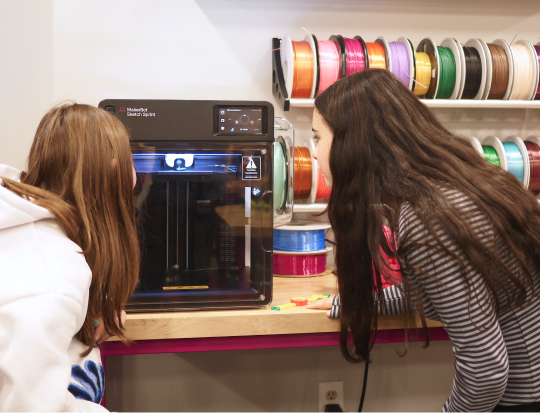
A 3D printer is the closest thing in a school to professional product development, because it forces the full cycle. Model it, slice it into machine instructions, print it, find out the tolerance is wrong, revise, print again.
Students learn things that only show up in physical manufacturing: how orientation affects strength, why overhangs need support, why the part that fit perfectly on screen does not fit at all. That is the high school engineering design expectation in practice, breaking a complex problem into manageable pieces and solving them.
Ventilation and enclosure have to be settled before a 3D printer goes into a classroom, which makes this a decision about the room as much as about the machine. The NIOSH guidance further down sets out what to assess.
Educational Robotics Platforms
At this level a platform has two jobs: carrying a course through the school year, and surviving a competition season if the school runs one. Competition adds what classroom work cannot, which is a deadline, a judge, and another team’s robot on the same field.
Students take on mechanical design and fabrication, drivetrain and manipulator engineering, sensor integration, and autonomous programming. The team roles and documentation practice come with the format rather than having to be imposed by a teacher.
Platform choice at this level should follow the pathway rather than the price list. A program feeding into an engineering or advanced manufacturing pathway wants a metal-build platform with real fasteners and a programmable controller. A program feeding into computer science may get more out of a simpler chassis and more time spent on autonomous code. We would rather ask about the pathway than send you a catalog.
Educational Drones and the FAA Rules That Actually Apply
Here is the conclusion first, because it catches schools out. A typical K-12 drone program falls under FAA Part 107, which means a person holding a Part 107 remote pilot certificate has to fly the drone or directly supervise the flying. The recreational rule most people assume applies generally does not, unless the program is run by a college, a JROTC unit, or a group chartered by an FAA-recognized community-based organization.
The FAA’s recreational flyer rules are the ones people know. Register any drone weighing “250 grams (0.55 lbs) or more,” take the free online Recreational UAS Safety Test, fly at or below 400 feet in uncontrolled airspace, and keep the aircraft within visual line of sight. Those rules apply to recreational flying.
A school program is not recreational flying. The FAA’s guidance for educational users explains that the statutory exception for education covers “institutions of higher education, Junior Reserve Officers’ Training Corps (JROTC) programs, and educational programs chartered by an FAA-recognized Community Based Organization.” The agency then states the consequence plainly: “Educational organizations that do not qualify as institutions of higher education or are not part of a JROTC program must be chartered by a recognized CBO to operate under § 44809; otherwise, those organizations must operate under Part 107.”
A typical K-12 school is not an institution of higher education. Unless it has a JROTC program or is chartered by a recognized community-based organization, its drone program falls under Part 107, which requires a certificated remote pilot who is “at least 16 years old” and has passed the FAA aeronautical knowledge exam.
For most schools that means a teacher or coach holds the certificate and operates or supervises the flying. It is a manageable requirement, and a motivated high school junior can hold the certificate too, but it needs to be planned for rather than discovered.
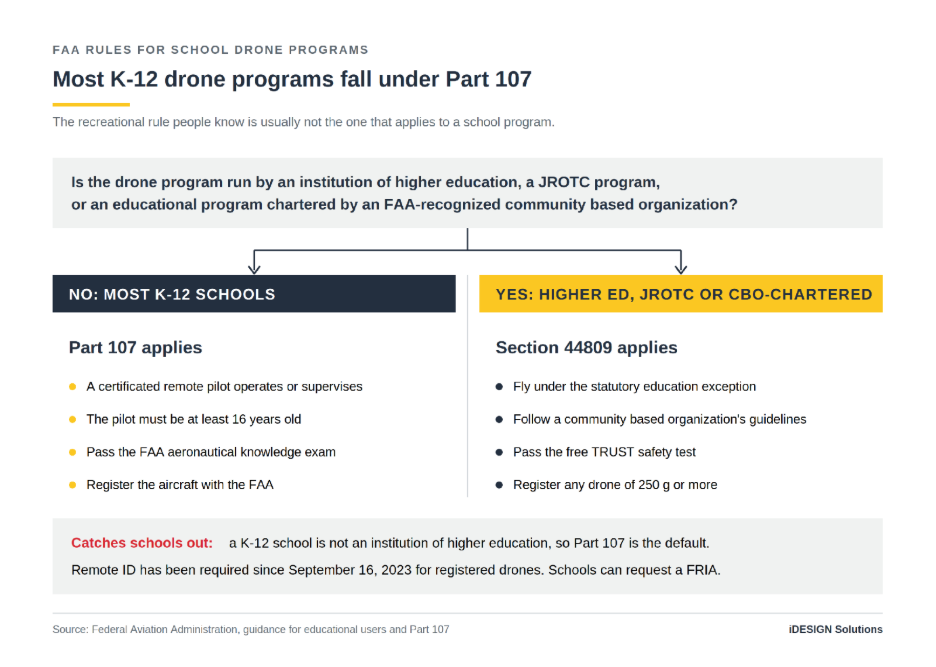
One further requirement applies, and one provision works in your favor. The FAA states that “as of September 16, 2023, if your drone requires an FAA registration number it will also be required to broadcast Remote ID information.”
The provision is a school-specific one. The FAA states that “educational institutions, including primary and secondary educational institutions, trade schools, colleges, and universities are eligible to request the establishment of a FRIA,” an FAA-Recognized Identification Area where drones may be flown without Remote ID equipment. If you are planning a permanent flying area, start that application early.
We stock classroom drone platforms and are glad to talk through weight class, certification and FRIA questions before you order rather than after.
Laser Cutters and Engravers
Draw a box in the wrong units and a laser cutter will happily produce a box the size of a stamp. The machine executes the file exactly, which is a kind of precision students cannot fake.
Students pick up real material science along the way: kerf, which is the width of material the beam burns away, focal length, the difference between cutting and engraving passes, and which materials must never go into the machine. Flat-pack design for assembly is a real engineering skill and it happens naturally here.
The specification that matters most for a school is enclosure. The laser safety section explains why, and it is the one place we would push back on a purchasing decision made purely on price.
UV Printers
UV printing covers the part of design education that classrooms usually miss, which is production. Color management, substrate preparation, and printing directly onto an object are the difference between a design that exists as a file and a product someone could actually sell.
Paired with a digital cutter, this becomes the fast iteration layer of a secondary makerspace: signage, decals, apparel, packaging mock-ups, stencils, and prototypes that look finished.
It is also the most natural bridge to entrepreneurship in the whole tool set, and to the employability skills Perkins names. Student-run enterprises tend to start here.
Makerspace Tools for Colleges and Universities
Colleges and universities buy for different reasons. The question stops being standards coverage and becomes accredited competence, applied research capacity, and service to local industry.
What Drives the Equipment Decision at This Level
For engineering programs, the requirement comes from the accreditor. ABET’s criteria for accrediting engineering programs require “a culminating major engineering design experience that 1) incorporates appropriate engineering standards and multiple constraints, and 2) is based on the knowledge and skills acquired in earlier course work.”
ABET also expects graduates to demonstrate “an ability to apply engineering design to produce solutions that meet specified needs with consideration of public health, safety, and welfare, as well as global, cultural, social, environmental, and economic factors.”
The capstone is an accreditation requirement. That a capstone worth the name needs somewhere to build is our inference, not ABET’s wording. ABET is the accreditor for US engineering programs, not a government agency, which matters when you cite it.
Community and technical colleges have a second driver. Perkins V funds postsecondary CTE alongside secondary, and the same programs of study language applies, with its requirement that a sequence culminate in a recognized credential.
Advanced 3D Printing, Laser, and UV Systems
At this level the machines gain multi-material capability, engineering polymers, and tighter tolerances. The safety model changes with it, moving from a classroom enclosure to a dedicated ventilated room, written standard operating procedures, and in the case of lasers an institutional laser safety program built around the ANSI Z136.1 standard.
The work changes too. Short-run production for industry partners, jigs and fixtures for a local manufacturer, and prototypes that go into a real product cycle are all normal at this level.
Drone and Robotics Platforms on Campus
Campus programs are where the FAA rules get easier rather than harder. A college or university is an institution of higher education, which means it can operate under the statutory education exception instead of defaulting to Part 107, and it is eligible to request a FRIA for a campus flying area.
On robotics, campus platforms move toward industrial formats: real controllers, real pneumatics, and workcells that mirror what a graduate will meet on a production floor. That connects directly to the adoption figures earlier on this page. The installed base is still small, which means the people who will specify, install and maintain the next wave of it are sitting in these programs now.
Safety, Compliance, and Procurement in a US Makerspace
Compliance causes more trouble after delivery than anything else in a makerspace project, and almost all of it is avoidable beforehand.
One scope note first. OSHA regulations apply to employees, and school district staff are employees. How each state treats students in a school shop or lab varies, and some states run their own OSHA-approved plans with their own rules. Read this section as the applicable federal standards and sound practice for equipping the room, and confirm student-specific requirements with your state agency and district risk manager.
| Tool | Main safety or compliance consideration | Primary source |
| Powered electrical equipment | Must meet OSHA approval requirements; districts usually verify this with an NRTL mark tied to the exact model | OSHA 29 CFR 1910.303(a) and 1910.399 |
| 3D printers | Enclosure and local exhaust ventilation ahead of PPE | NIOSH |
| Resin 3D printers | Skin protection, chemical-resistant gloves, solvent handling | NIOSH |
| Laser cutters | Enclosed machine; FDA classification applies to the manufacturer | FDA 21 CFR 1040.10 |
| Eye protection (PPE) | Select personal protective equipment based on the identified hazard | OSHA 29 CFR 1910.133, ANSI Z87.1 |
| Drones, most K-12 programs | Part 107 certificated remote pilot, 16 or older | FAA |
| Registered drones | Remote ID required since September 16, 2023, or fly in a FRIA | FAA |
Check the NRTL Listing Before You Buy
The label on the machine is the first place to look, which is why it is surprising how often this check gets skipped.
OSHA’s electrical standard is short: “the conductors and equipment required or permitted by this subpart shall be acceptable only if approved, as defined in § 1910.399.”
Section 1910.399 is where the meaning sits, and it gives three routes rather than one. The first is the familiar one: equipment is acceptable “if it is accepted, or certified, or listed, or labeled, or otherwise determined to be safe by a nationally recognized testing laboratory.” The second covers equipment no NRTL handles, which another federal, state or local authority may inspect instead. The third covers custom-made equipment, where the manufacturer’s own test data can serve if the employer keeps it on file.
So an NRTL listing is not the only lawful path. It is the one a school will take in practice, because the other two assume either a custom build or an inspecting authority willing to take the job on.
OSHA’s NRTL program recognizes private organizations to test and certify products against applicable safety standards, and explains that “after certifying a product, the NRTL authorizes the manufacturer to apply a registered certification mark to the product.” UL and Intertek, whose mark most buyers know as ETL, are among them. Because the roster and each laboratory’s approved testing scope change over time, treat OSHA’s current list as the authority, and check both the listing and the lab’s scope at the time of purchase.
This matters more for makerspaces than for most classroom technology, because printers, engravers and cutters are frequently bought directly online from outside the US. When schools ask us to price a machine they found online, this is the first thing we look at.
3D Printer Emissions and Ventilation
Putting a 3D printer in a small room with the door closed is the most common mistake we see.
NIOSH’s guide for makerspaces, schools, libraries and small businesses, published in November 2023, is the most directly relevant US document, and it is unusually careful about what the research does and does not establish. In a survey of workers directly involved in maintaining and using 3D printers, “59% (27 of 46) reported respiratory symptoms.” That is a small occupational sample rather than a classroom study, so treat it as a reason to control emissions rather than as a prediction about students.
Researchers cited in the guide have found that printing with ABS “yields higher airborne ultrafine particle concentrations than PLA materials,” which leads NIOSH to a practical suggestion: substituting PLA for ABS “can reduce the hazard from ultrafine particulate emissions, provided printing PLA is within the printer’s specifications and otherwise appropriate for the task.”
On ventilation, researchers who assessed three makerspaces at a university “recommended a minimum of six air changes per hour (ACH) within the makerspace and/or using a portable HEPA filter to lower ultrafine particle concentrations during printer operation.” That figure comes from a cited study rather than from NIOSH itself, and three university spaces are a narrow evidence base for a classroom, so use it as a planning benchmark to discuss with your facilities team. On enclosure, a study reported in the same guide found that “using a filtered enclosing hood placed over a 3D printer resulted in a reduction of 97% to 99% of particle emissions.”
Work through NIOSH’s hierarchy of controls in order rather than jumping to the bottom of it:
- Substitution. Choose PLA over ABS where the print allows it.
- Engineering controls. Enclose the printer, use local exhaust ventilation, and increase room ventilation. NIOSH also suggests printing in a room “under a negative air pressure differential relative to adjacent areas.”
- Administrative controls. Restrict access to trained users, limit time near a running printer, and write standard operating procedures.
- PPE. Last, not first. NIOSH puts engineering controls above PPE because they “control exposures without significant human interaction.”
A school that buys respirators but leaves the printer open in a sealed room has spent money on the least effective control.
Resin printers are a different decision, not a variant of the same one. NIOSH notes that chemicals in the liquid resins used in resin printing, or vat photopolymerization, “may cause skin irritation or sensitization,” post-processing “typically involves placing the 3D object in a chemical bath (often isopropanol),” and NIOSH calls for “nitrile or appropriate chemical-resistant gloves.” If you are considering resin, budget for the handling protocol as well as the printer.
Laser Safety
Laser products in the US are regulated at the point of manufacture rather than the point of use. The FDA’s regulation requires that “each laser product shall be classified in Class I, IIa, II, IIIa, IIIb, or IV,” and the agency explains that labels must carry “a statement certifying that the laser complies with FDA safety regulations” along with the power output and hazard class.
The classification matters for classroom suitability. The FDA describes Class IIIb as an “immediate skin hazard from direct beam and immediate eye hazard when viewed directly,” and Class IV as an “immediate skin hazard and eye hazard from exposure to either the direct or reflected beam,” which “may also present a fire hazard.” A properly enclosed and interlocked machine is what brings a powerful tube into a range a school can supervise. The enclosure is not a convenience feature.
Two points on the regulatory picture, because they are easy to get wrong. OSHA has no general industry laser standard; its laser hazards page routes back to the general PPE and eye protection rules and references ANSI Z136.1. That standard is a private consensus document published through the Laser Institute of America, so OSHA references it instead of requiring it. And laser cutting produces combustion byproducts from whatever is being cut, so extraction sits under the general rules on air contaminants rather than under any laser-specific federal rule.
Ask for the FDA classification and compliance documentation against the exact model number, and never take a laser class from a marketing page.
Eye Protection and PPE
OSHA requires that employers “ensure that each affected employee uses appropriate eye or face protection when exposed to eye or face hazards from flying particles, molten metal, liquid chemicals, acids or caustic liquids, chemical gases or vapors, or potentially injurious light radiation.” Protectors must comply with one of three editions of ANSI Z87.1 that OSHA incorporates by reference: the 2010, 2003 or 1989 (R-1998) version.
Name the 2010 edition in full when you write your purchase specification. Its title tells you it was written with schools in mind: Occupational and Educational Personal Eye and Face Protection Devices.
| Hazard in the room | What to specify |
| Flying particles, dust, machining | Z87.1-compliant impact-rated safety glasses or goggles |
| Chemical splash, resin handling | Z87.1-compliant chemical splash goggles plus chemical-resistant gloves |
| Injurious light radiation | Filtered protection matched to the source |
| Laser work | Eyewear matched to the wavelength and power of the specific machine |
Protective equipment is a consumable. Budget to replace it, and stock enough that a student is never waiting for a pair, which is why we list classroom safety supplies alongside the machines.
How to Build a Classroom Makerspace, Step by Step
Here is the sequence we work through when a school asks us to help plan a space. The machines come into it late, and deliberately so.
Start From a Standard or Program Requirement
Name the published requirement the space will serve before you name a single machine. An NGSS engineering design expectation. A state computer science credit. A Perkins-funded program of study. An ABET capstone.
Doing this narrows the equipment question to something answerable, and it makes the budget rationale far easier to explain to a business official. If your district has completed its Perkins comprehensive local needs assessment, that is the single most useful document to have open while you plan.
Let Ventilation and Power Choose the Room
A smaller room with the right airflow and enough circuits will outperform a larger room without them, every time.
The hierarchy of controls set out in the safety section is the reason. Airflow is an engineering control, and engineering controls have to be designed into a room rather than added to it afterwards. We have been called in to retrofit extraction into rooms chosen for their square footage, and it costs more than choosing correctly at the start.
Count your outlets too. A bank of printers, a laser, a dust extractor, and thirty charging devices add up faster than people expect.
Budget for Consumables, PPE, Training, and Maintenance
The purchase price is only one part of what a makerspace costs. Filament, vinyl, resin, laser consumables, and replacement protective equipment recur every year, and manufacturer-recommended maintenance means someone’s time as well as parts.
A strong opening budget with nothing behind it tends to run out around the time the first consumables do. A smaller starting set with a realistic annual line attached keeps working year after year.
Train the Teacher First
No national dataset tracks makerspace training, so what follows is a pattern from our own installations rather than a published finding. The spaces that go quiet are almost always the ones where nobody had time to learn the equipment before it arrived.
Perkins goes further than permitting training. The statute requires that local funds support programs that “provide professional development for teachers, faculty, school leaders, administrators,” and among the activities it lists is “training for the effective use of community spaces that provide access to tools, technology, and knowledge for learners and entrepreneurs, such as makerspaces or libraries.” Raise that with whoever administers your district’s allocation.
We run training and curriculum services for exactly this reason. Build the training into the same plan as the purchase, and schedule it before the machines arrive.
Funding and Procurement Paths
Perkins V is the most direct federal route for CTE equipment, and it runs through your state agency rather than to schools directly. Districts apply locally, on the cycle their state agency sets.
The statute is unusually specific about what the money may buy. Among the local uses it permits is “appropriate equipment, technology, and instructional materials (including support for library resources) aligned with business and industry needs, including machinery, testing equipment, tools, implements, hardware and software.” If you are drafting a request, quote that language back.
Beyond Perkins, districts commonly combine local capital funds, bond measures, career pathway grants at the state level, and partnerships with local employers who have a direct interest in the pipeline. Which of these is realistic depends on your state and district. Tell us which state you are in and we will tell you which of these routes we have seen fund equipment there.
On the purchasing side, we work the way schools actually buy. Formal quotes, purchase orders, W-9 documentation, tax-exempt workflows and district procurement timelines are routine for us rather than exceptions we have to arrange.
Where to Start With iDESIGN Solutions
Most schools we talk to have already decided they want a makerspace. What stops them is usually the practical questions this page has worked through: which tools suit their grade range, whether the room can take them, what has to be listed and certified, and how any of it gets through procurement.
Those are answerable questions, and answering them is the part we do. We have equipped everything from a single classroom kit to a full CTE lab build through our STEM and makerspace solutions, and the projects that succeed are consistently the ones where somebody settled the room and the training before the purchase order went in.
Tell us your grade range, your program goals, your student count, and your budget. We will come back with a starting set that fits all four, and a second phase you can bring forward when the budget allows. Contact our sales team when you are ready.
About the Author
Andy Fenos is the President and Founder of iDESIGN Solutions, an educational technology company with more than 25 years of experience bringing hands-on coding, robotics, drones, AI, and design into K-12 classrooms and CTE programs. He works closely with education technology partners to connect classroom learning with real-world, competition-based experiences, and leads the team that specifies, supplies and supports makerspace and CTE equipment for US schools and districts.
References
Next Generation Science Standards: K-2 engineering design
Next Generation Science Standards: Grades 3-5 engineering design
Next Generation Science Standards: Middle school engineering design
Next Generation Science Standards: High school engineering design
Next Generation Science Standards: Engineering design appendix
National Science Teaching Association: State standards adoption
US Department of Education: Perkins state allocations
US Code Title 20 Section 2354: Perkins local needs assessment
Perkins Career and Technical Education Act: Statutory definitions
US Code Title 20 Section 2355: Perkins local uses of funds
North Carolina General Statutes: Graduation requirements
North Carolina Department of Public Instruction: Computer science requirement
South Carolina Department of Education: High school requirements
Tennessee Department of Education: Graduation requirements
Arkansas Division of Elementary and Secondary Education: Graduation requirements
National Science Board: Science and Engineering Indicators
National Center for Science and Engineering Statistics: Emerging technology adoption
Bureau of Labor Statistics: Employment projections 2024-2034
Bureau of Labor Statistics: Occupational separations and openings
Bureau of Labor Statistics: Electricians outlook
Bureau of Labor Statistics: Industrial machinery mechanics outlook
Bureau of Labor Statistics: Mechanical engineers outlook
Bureau of Labor Statistics: Electrical engineers outlook
Bureau of Labor Statistics: Welders outlook
Bureau of Labor Statistics: Industry employment and output
OSHA: Electrical equipment approval standard
OSHA: Definitions applicable to electrical standards
OSHA: Nationally Recognized Testing Laboratory program
OSHA: Current list of Nationally Recognized Testing Laboratories
OSHA: Hazard communication standard
OSHA: Air contaminants standard
OSHA: Eye and face protection standard
NIOSH: Safe 3D printing guide for schools
FDA: Laser product performance standard
FDA: Laser product classification guidance
FAA: Educational users guidance
FAA: Part 107 remote pilot certification
Consumer Product Safety Commission: Children’s product definition
ABET: Engineering accreditation criteria
Frequently Asked Questions
Do we need a dedicated room, or can a makerspace work on a cart?
A cart is a perfectly good makerspace for 3D pens, cutting machines, and beginner robotics kits, and it carries an advantage a room does not: the makerspace travels to the class instead of the class traveling to it. For an elementary school with no spare space, this is usually the honest answer.
That approach becomes less practical once a 3D printer, laser cutter or UV printer joins the equipment list. These machines introduce ventilation, enclosure, power and operating requirements that are usually better handled in a fixed location. Several schools we work with use both approaches: a mobile cart for elementary activities and a dedicated room for upper grades.
Does someone need an FAA certificate to fly a drone with students?
In most K-12 programs, yes. A certificated remote pilot must operate or directly supervise the flight. The education exception in federal law reaches higher education, JROTC and CBO-chartered programs, and an ordinary school is none of the three, so it operates under Part 107.
The certificate itself is less of an obstacle than schools expect. It is a written exam, the Unmanned Aircraft General knowledge test, booked at an FAA-approved testing center, and there is no flight test. The other conditions are that the candidate can read, speak, write and understand English and is in a physical and mental condition to fly safely. What it really costs is study time, and that has to be scheduled rather than assumed.
How many students can realistically share one 3D printer?
Fewer than most schools assume, and the number falls out of arithmetic rather than a rule of thumb. Take the print time for one student’s part, multiply it by the class size, and divide by the hours the machine can run in a week including overnight. That tells you how many printers the assignment needs.
Most programs we work with respond by shrinking the part rather than buying more machines, which is usually the better answer, and by running a booking queue so printing happens outside lesson time. Tell us the assignment and we will size the bank against it.
Can we start with one tool and add more later?
Yes, and in our experience it produces better programs than buying everything at once. Start with the tools where a whole class works at once, get the teaching established, then add the machine that needs a room of its own. Staging also fits how school budgets actually arrive.
H3: What should a school check before buying makerspace equipment online?
Work through it in this order, because each step can end the conversation before you waste time on the next one. Start with the electrical approval documentation, including any NRTL listing tied to the exact model, because it may determine whether the district can accept the machine. Then confirm the manufacturer’s safety and compliance documentation, followed by the paperwork your district needs in order to pay the seller.
That last step is where most online purchases stall, and it catches people by surprise. A good price is no help if the transaction cannot be processed, and sellers outside the US are frequently unable to work with a school purchase order.
Does a makerspace need a teacher with a technology background?
No, and requiring one is a common reason spaces never get built.
The teachers who run the best spaces we see are usually the ones most comfortable saying they do not know the answer and working it out alongside students, which is the design cycle itself. What matters more is a written set of operating procedures and a named person to call when a machine stops.
How do we handle student work that fails?
Design it into the assessment rather than treating it as an exception.
Grade the diagnosis, not the object. A short test log does the job: what the student predicted, what actually happened, and what changed on the next attempt. A prototype that fails and gets diagnosed correctly demonstrates more learning than one that works by accident, and schools that grade only the finished object tend to find students quietly discarding their failures, which removes exactly the part that was worth teaching.